
Case study · Open-source CMS
Podcast · Self-hosted
Badal.
A podcast CMS built for those who want to keep control.
Publishing a podcast today means picking a side: Spotify, Apple, Acast, Ausha… Each platform locks creators into its ecosystem, dictates display rules, harvests listener data, and charges a monthly fee for basic features.
For an independent podcaster who wants to self-host their content, own their RSS feed, and customize their website, the options are either too heavy (WordPress + plugins) or too limited (static pages with no admin).
Persona
« I want to publish my episodes, see my stats, and have a site that looks decent — without becoming a devops engineer or paying €15/month for a podcast host. »AAlex – Independent podcaster · Weekly show · 2K listeners
01 — Research & framing
From MP3 to live, the shortest path.
The starting point isn’t a technical spec – it’s a question: what is the shortest path from « I have an MP3 » to « my podcast is live »? Analyzing existing solutions (Anchor, Podbean, WordPress + Seriously Simple Podcasting) revealed a recurring pattern: cluttered interfaces that drown the 3 essential actions — publish an episode, check stats, customize the site.
- Upload MP3
- Fill metadata
- Publish
- RSS auto-generated
- Live on all platforms
User journey — from MP3 to live
Guiding principleEach screen should answer one question. If the user wonders « what am I supposed to do here? », the screen is doing too much.
02 — Information architecture
Seven entries, sorted by habit.
The admin navigation was reduced to 7 entries (vs. 15–20 in a typical WordPress), organized by frequency of use.
- 01
Dashboard
Overview: key stats, latest episode, quick actions. Answers « where am I? »
- 02
Episodes
Create, edit, schedule. The heart of the tool. Audio + cover upload on one screen.
- 03
Appearance
Colors, fonts, layout – all with live preview. No code to touch.
- 04
Statistics
Plays per episode, trends, CSV export. No vanity metrics – only what’s useful.
03 — Design decisions
What stays, what goes.
Scope is a design decision too. Every “no” keeps the tool light enough to install in seconds and simple enough to use without a manual.
Kept
Built in from day one
- Single-screen setup (no 5-step wizard)
- Dark theme by default (studio context)
- AJAX autosave on appearance settings
- Persistent player on public pages
- Auto-generated RSS feed
- Zero-config: everything detected at setup
Discarded
Left out on purpose
- No database (unnecessary complexity)
- No plugin system (scope creep)
- No multi-user (v1 = solo)
- No third-party embedded player
- No third-party tracking (privacy)
- No JS framework (raw performance)
04 — Micro-interactions
UX doesn’t stop at the sitemap.
The details that make the difference.
Smooth page transitions
Fade in/out between views, even without a SPA.
Real-time font preview
Preview text changes on the fly in the admin.
Auto duration detection
ffprobe extracts duration on upload, no manual input.
Clickable timestamps
In transcriptions, a click jumps to the exact moment in the player.
Visual rate-limiting
On lockout, a countdown is shown instead of a generic error.
Smart setup redirect
If no config exists, any URL redirects to installation.
05 — The interface
Screen by screen, one question each.
From the public homepage to the security audit, a tour of the screens that make up Badal.
01
Homepage
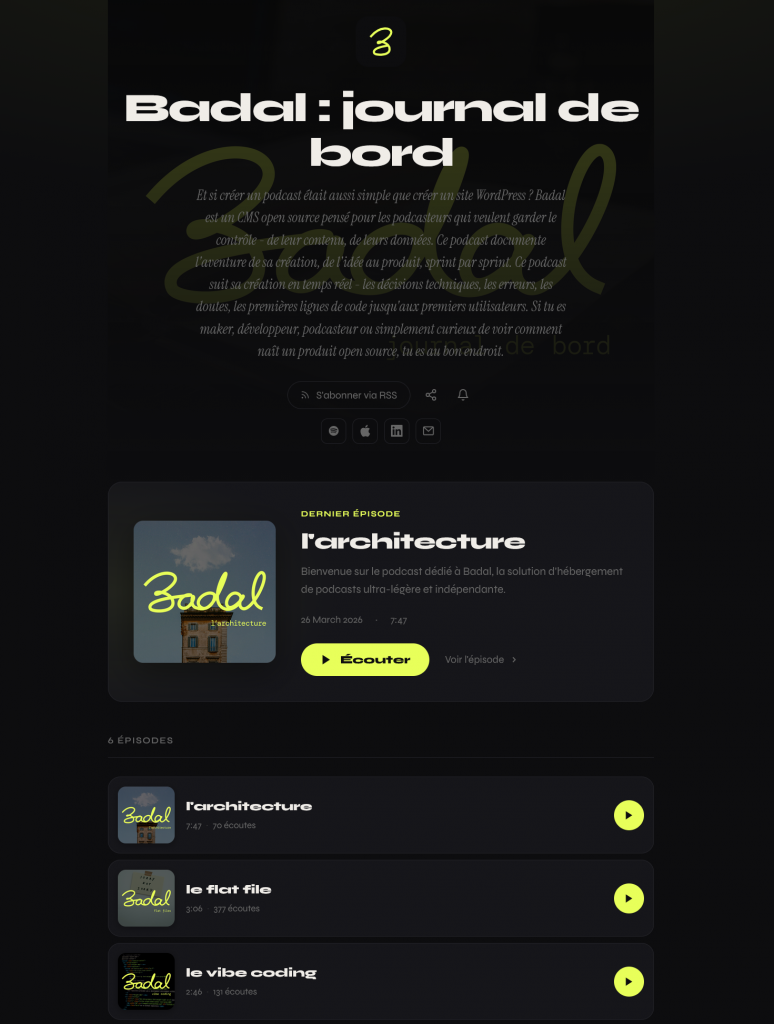
The homepage sets the podcast’s identity at a glance: title, description, subscription links and distribution platforms.
The latest episode is front and center – cover art, title, duration, and a direct play button.
Below it, the full episode list gives a clean overview – cover, title, duration, play count – with a play button to jump into any episode without leaving the page.
02
Dashboard
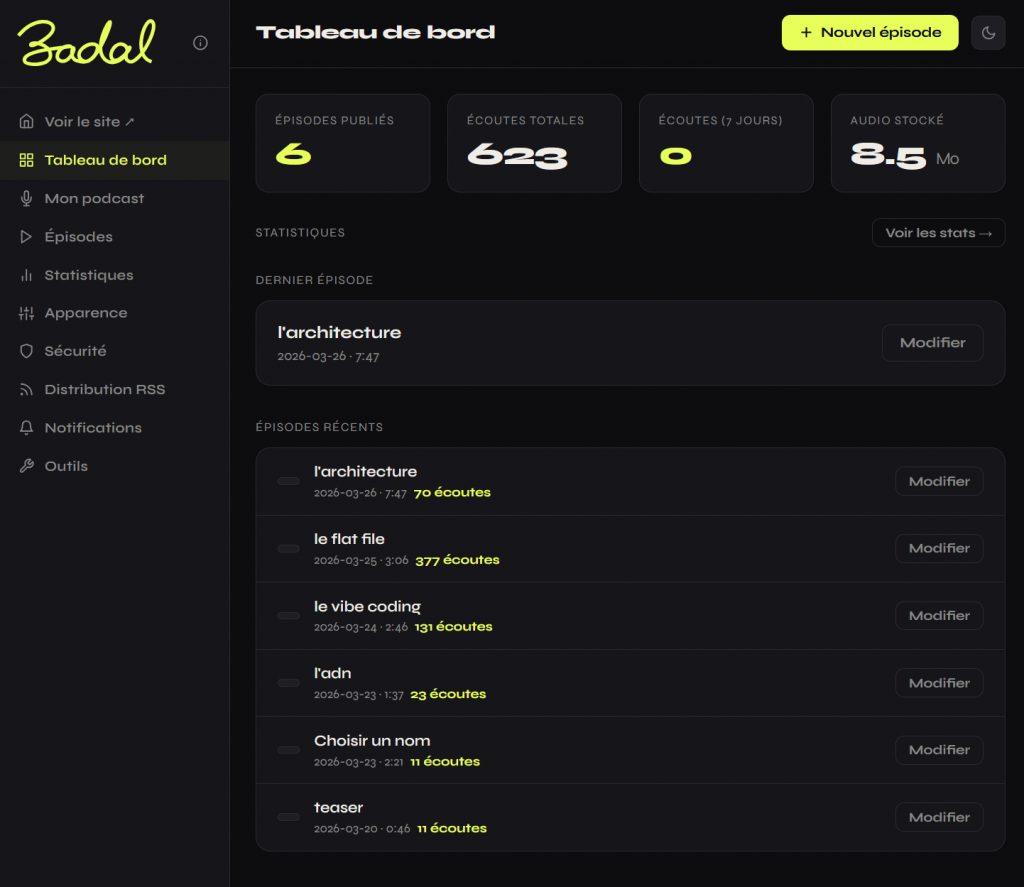
The dashboard gives an instant snapshot of your podcast’s health – episodes published, total plays, last 7 days, storage used.
The latest episode is pinned at the top for quick edits.
Below it, the full episode list with play counts and direct edit buttons, so you stay in control without digging through menus.
03
Podcast
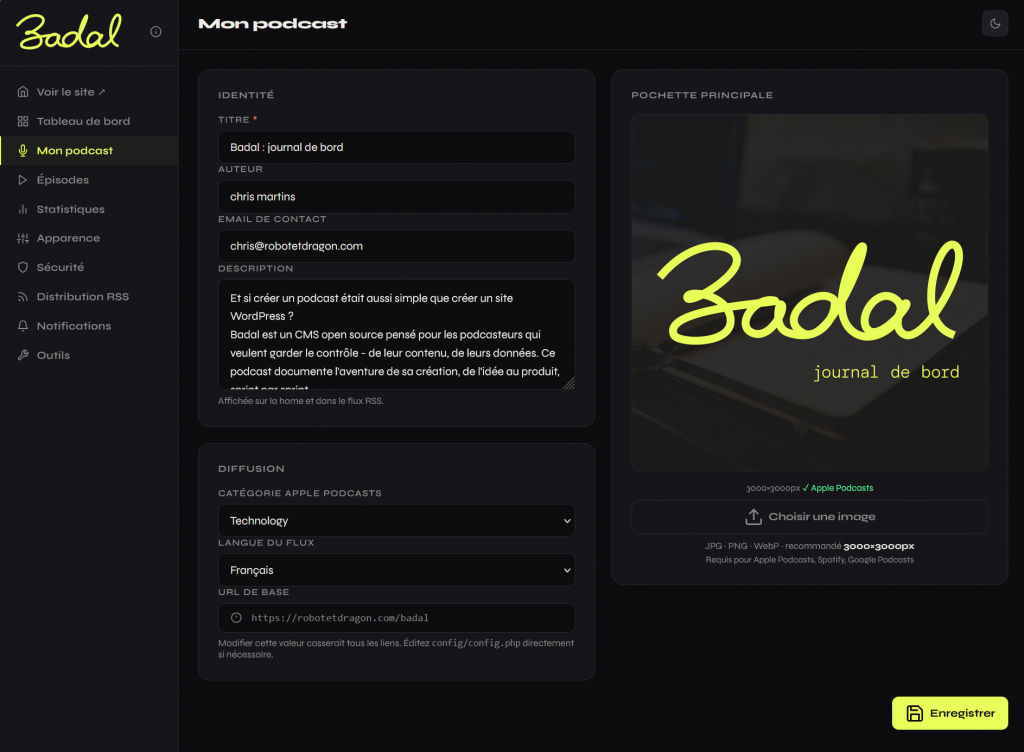
Your podcast’s identity in one place – title, author, description, cover art.
Set your distribution settings once: Apple Podcasts category, feed language, base URL.
Everything that defines your show across all platforms, managed from a single screen.
04
Episodes
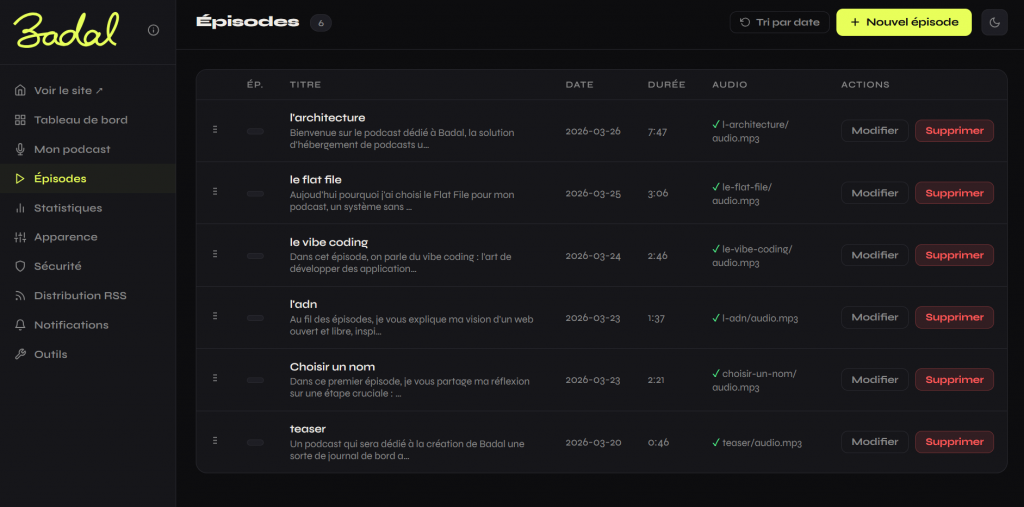
All your episodes at a glance – title, description excerpt, date, duration, audio file status.
Reorder them by drag and drop, edit or delete any episode in one click. A clean list to manage your feed without getting lost.
05
Statistics
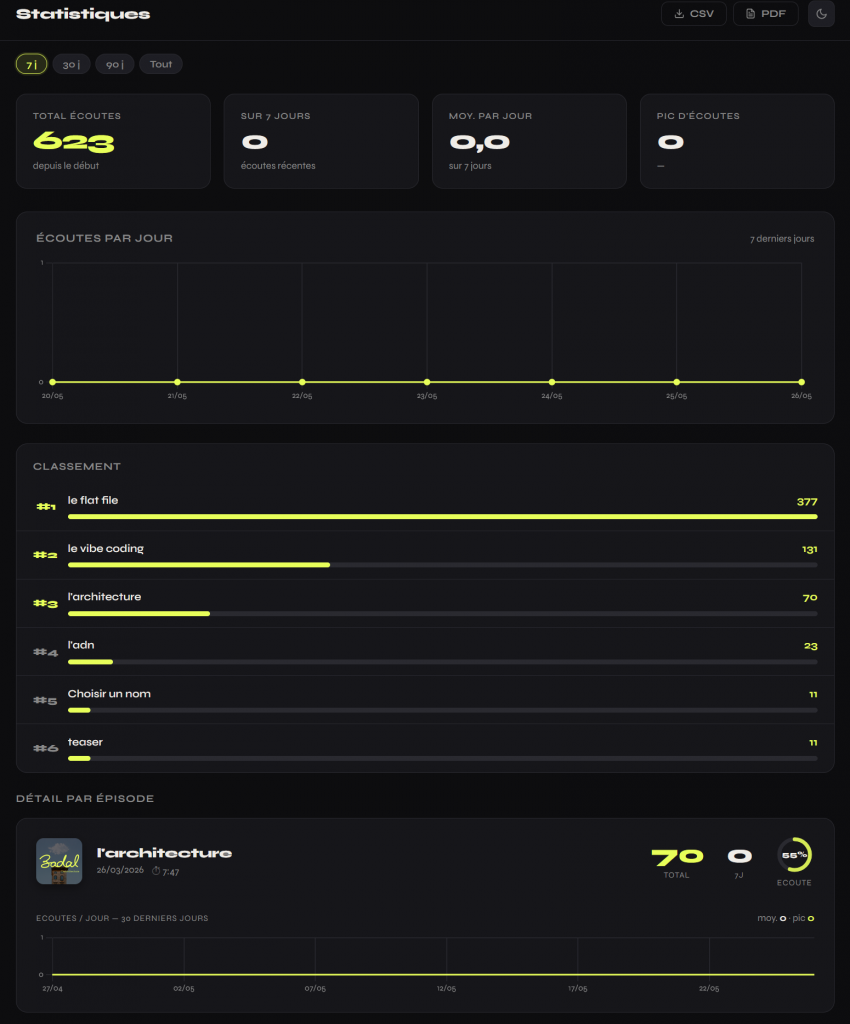
Total plays, daily average, peak – filtered by 7, 30, 90 days or all time.
A daily chart to spot trends, an episode ranking to see what resonates, and a per-episode breakdown with play rate. Export everything as CSV or PDF in one click.
06
Appearance
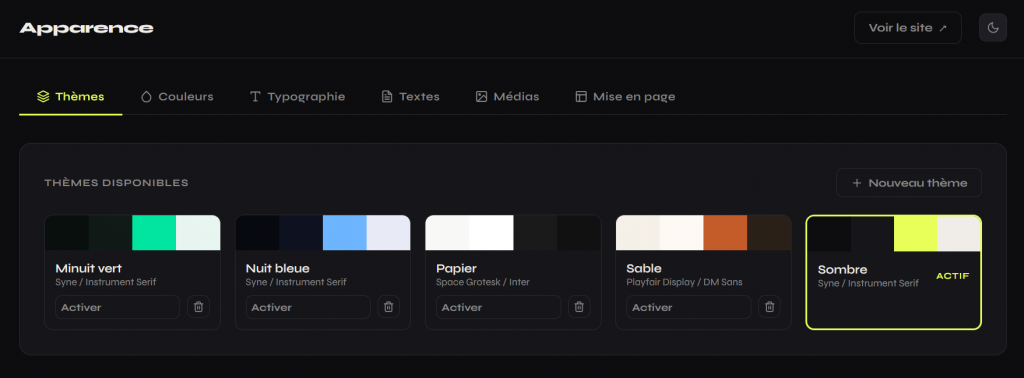
Choose a theme, tweak colors, typography, texts, media and layout – all from one place.
Switch your podcast’s look in one click, or build your own theme from scratch.
07
Security
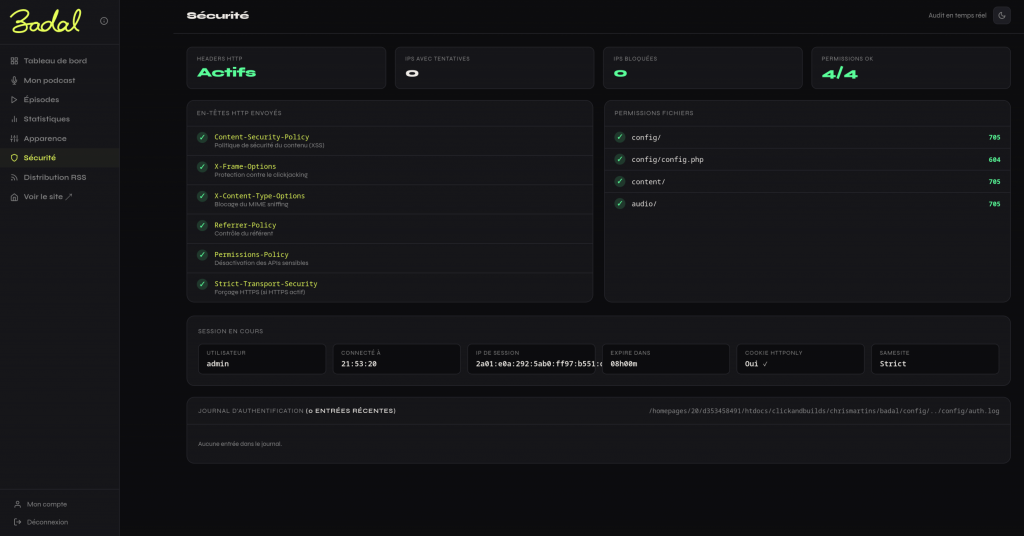
A real-time security audit of your installation – HTTP headers, file permissions, active sessions, authentication logs.
You see exactly what is protected and what needs attention, without digging into config files.
08
RSS
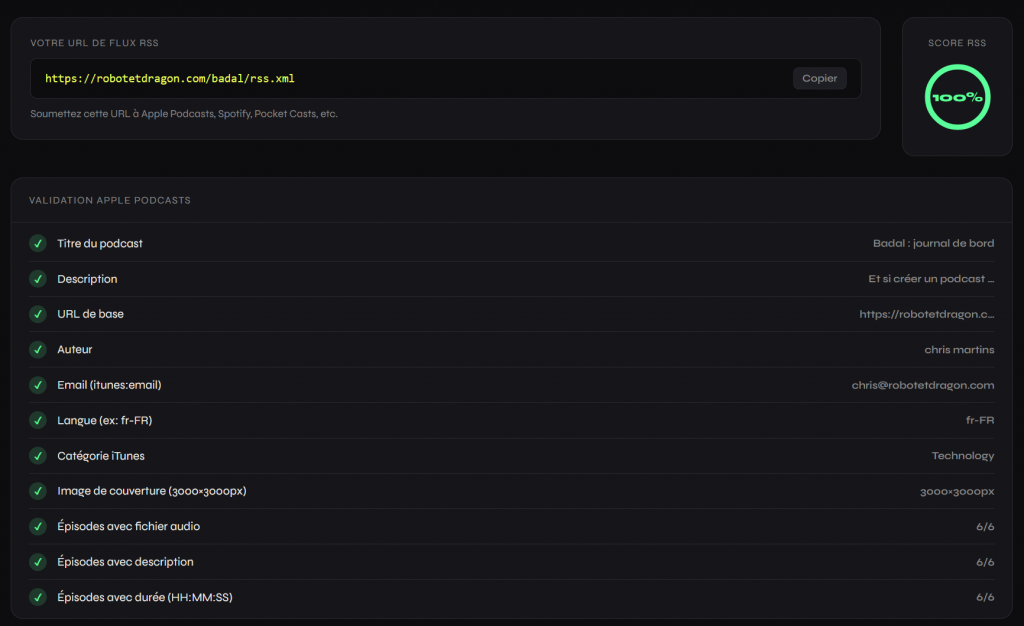
Your RSS feed URL, ready to submit to Apple Podcasts, Spotify, Pocket Casts and others.
A built-in validator checks every required field and gives you a score – so you know your feed is clean before you submit it anywhere.
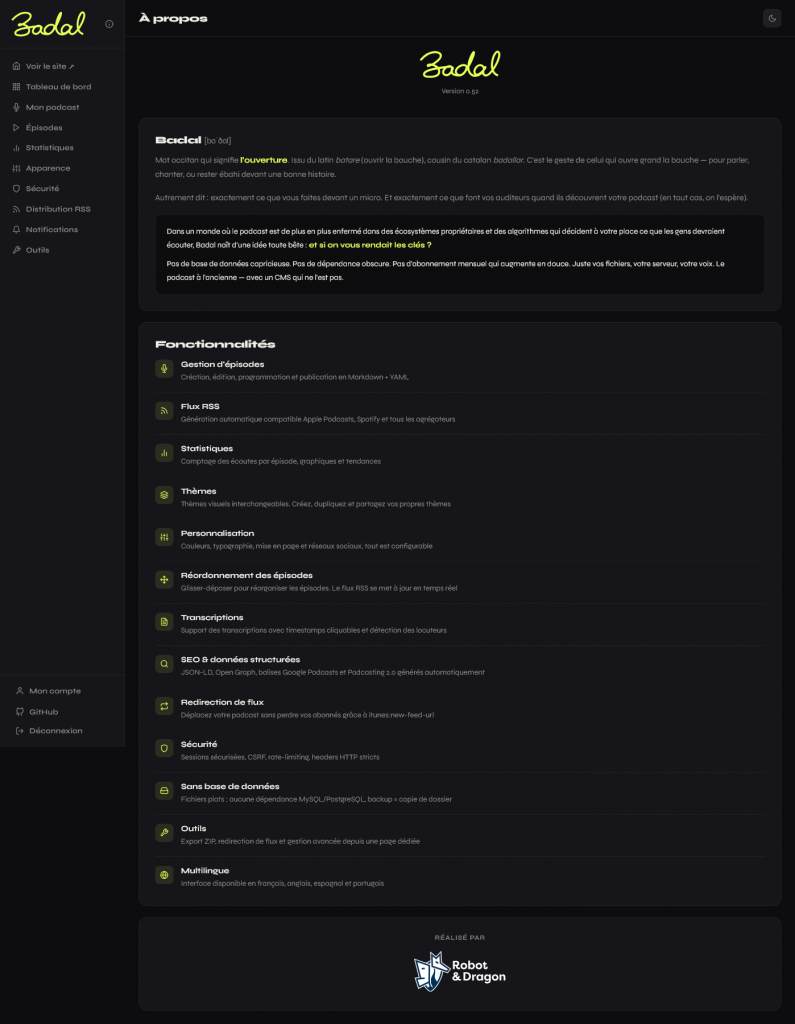
09
About
The about page – Badal’s origin, philosophy and full feature list.
Everything that makes it different, in one place: episode management, RSS feed, statistics, themes, customization, drag-and-drop reordering, transcriptions, SEO, feed redirect, security, no database, tools, and multilingual support.
06 — Technical choices
Technical choices serving UX.
Every technical decision in Badal is driven by a user benefit, not an engineering preference.
- Browser
- Apache + .htaccess
- PHP Router
- Flat files (MD / YAML / JSON)
Architecture
| Choice | UX benefit |
|---|---|
| Flat files instead of MySQL | No database to create. Backup = copy a folder. Migration = move files. |
| Zero npm/composer dependencies | No « npm install » that fails. Upload, setup, it’s live. |
| CSS variables instead of Sass | The theme changes in real-time in the browser. No build step. |
| PHP audio proxy | Play counting is transparent. No JS analytics, no cookie wall. Server-side only. |
- Player
- /audio/ep.mp3
- PHP proxy (count + stream)
- stats.json
Audio proxy — transparent play counting
07 — Brand & identity
The name is an opening.
The calligraphic logo is a single continuous stroke – like a voice that flows without breaking. Two versions exist: the full wordmark and the « b » monogram used as favicon.
BadalOccitan · [baˈðal]
The name Badal comes from Occitan – « the opening », the gesture of opening one’s mouth wide to speak, to sing, or to stand in awe of a story.
Rooted in the Latin batare, cousin of the Catalan badallar.
08 — Results
Light by design, live in production.
Badal is in production at robotetdragon.com/badal. The source code is available on GitHub.
Setup time
Dependencies
Languages
Database
Badal is open source.
A podcast CMS with no database, no subscription, no compromise.